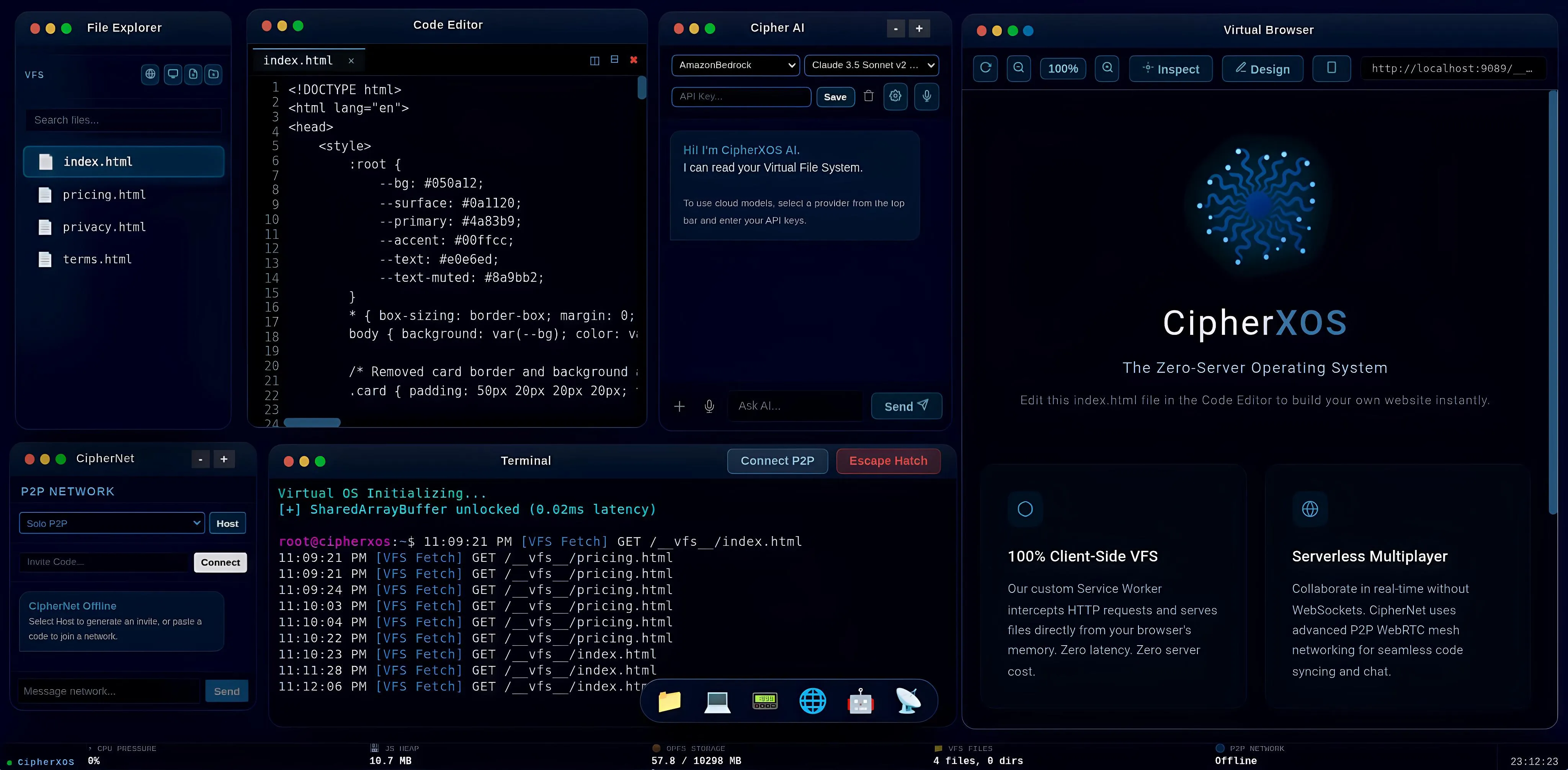
The Default Environment

The Zero-Setup Coding OS
for Everyone.

From your first line of code to full-stack enterprise development. One link. Zero servers. Absolute privacy.


Launch CipherXOS

Note: This Community Edition starts fresh on every reload. Upgrade to Enterprise to save your sessions permanently.

CipherXOS Desktop Environment

Built For:

Absolute Beginners Coding Students Pro Developers Enterprise Teams
[ / ]

In-Browser IDE

A full desktop-like environment running directly in your browser. Write HTML, CSS, and JavaScript using a professional-grade editor. Perfect for prototyping and frontend development.

<>

Virtual File System

Your files are saved securely in your browser's local storage (IndexedDB). It provides zero-latency file access and can store multi-file web projects up to your browser's quota limit.

[ O ]

Live Preview Engine

The built-in Virtual Browser instantly renders your code changes. There are no build steps or servers required. What you code is exactly what you see, updated in real-time.

<->

P2P Collaboration

CipherNet uses secure WebRTC to establish direct browser-to-browser connections. You can share your virtual workspace with colleagues globally without your data ever touching our servers.

[ AI ]

100% Offline AI

Connect to local models (Ollama) or run WebGPU models directly in your browser. Get intelligent self-healing code debugging without your proprietary code ever leaving your hardware.

[ >_ ]

Terminal & Shell

A fully functioning local bash emulator. Run network traces, mock hiring assessments, and standard file system commands securely inside the browser's isolated sandbox.

The Workspace Environment

Everything you need to build, test, and deploy web applications natively inside your browser window.

File Explorer

01. File Explorer

Manage your local HTML, CSS, and JS assets directly within your browser's IndexedDB. Your files persist securely without any backend storage.

  • [NEW] New File: Instantly create source code files.
  • [DIR] New Folder: Organize your workspace structure.
  • [MOD] Rename/Delete: Full file lifecycle management.

Beginners & Parents: No complex installations or broken paths. Just open the browser and start coding in a 100% safe sandbox.
Pro Developers: Full VFS (Virtual File System) mimicking a real OS. Perfect for rapid prototyping and local-first development.
Offline Capable: Continues functioning flawlessly even if the internet drops out completely.
Absolute Privacy: Zero code is ever sent to external cloud servers.

Code Editor

02. Code Editor

Powered by Monaco (the engine behind VS Code). Enjoy professional syntax highlighting, autocompletion, and multi-tab support.

  • Tabs Multi-File: Edit multiple files simultaneously.
  • VFS Sync Auto-Save: Changes sync instantly to your local storage.
  • Cyber Dark Themes: Gorgeous built-in developer themes.

Industry Standard: Built on Microsoft Monaco (the core of VS Code), giving you the exact same professional editing experience.
Students: Learn on the exact tools used by professionals, completely free, with instant live-reloading.
Enterprise Teams: Air-Gapped privacy ensures your proprietary keystrokes and code never leave the host device.
Zero Cloud Bills: Run your entire development workflow locally without paying for expensive cloud containers.

Virtual Browser

03. Virtual Browser

A real-time live preview engine. It instantly renders your Virtual File System natively in an isolated iframe with absolute zero latency.

  • 100% Scale Controls: Zoom in and out of your preview.
  • Inspect DOM Inspector: Debug elements in real-time.
  • Design Design Mode: Edit text visually on the webpage.

Instant Feedback: See your HTML/JS results immediately in 0ms without configuring complex local development servers.
Beginners: Watch your code come to life instantly, keeping engagement and learning momentum high.
Secure Sandbox: Untested or buggy code runs inside a strictly isolated iframe, protecting your actual computer.
Visual Design Mode: Edit text visually directly on the webpage for rapid prototyping.

Terminal

04. Terminal

A simulated bash environment allowing you to navigate the file system and run basic mock commands effortlessly without leaving the OS.

  • CLI Bash Commands: Use `ls`, `cd`, `cat`, and `echo`.
  • VFS Fetch Networking: Monitor internal network requests.
  • Escape Hatch Security: Emergency UI and state reset.

Safe Environment: Beginners can practice Bash CLI commands safely without risking any damage to their actual computer.
Pro Developers: A robust local terminal that monitors real-time virtual file system requests and emulates complex environments.
Network Monitoring: Watch active file system fetches and internal network activity in real-time.
Auto-Recovery: The terminal self-heals from fatal syntax or memory errors instantly.

CipherNet P2P

05. CipherNet P2P

A decentralized WebRTC mesh interface. Generate invite codes to host your workspace or join other developer environments globally without servers.

  • Host Share: Create an invite code for your environment.
  • Connect Join: Paste a code to enter someone else's OS.
  • Send Chat: Built-in P2P messaging interface.

Individual Students: Collaborate with friends instantly without paying for multiplayer cloud servers. Just share a code.
Enterprise Teams: Works securely on local office networks (LAN) via WebRTC. Decentralized and unblockable.
Mentorship Mode: Instantly join a peer's environment to pair-program and debug code together in real-time.
Zero Latency: True Peer-to-Peer connections ensure instant keystroke synchronization with zero cloud delay.

AI Assistant

06. Cipher AI

Built-in Code generation and debugging tool with Autonomous Self-Healing capabilities. Connect your own API keys for zero-server AI.

  • Auto Self-Healing Kernel: Automatically detects and patches runtime errors in preview.
  • Debug Terminal Recovery: AI intercepts and auto-fixes terminal command errors.
  • Send Context Aware: AI reads your VFS files securely in-memory.

Enterprise Privacy (BYOK): Code goes straight from your browser to the LLM. No third-party proxy servers to steal your data.
24/7 Personal Tutor: The Self-Healing Kernel automatically detects and patches runtime errors, perfect for beginners stuck on a bug.
Automated RAG: The AI natively reads your entire Virtual File System to understand your project context without manual copy-pasting.
100% Offline AI: Connect to local models via Ollama or WebGPU. Run Llama 3 or Mistral directly on your hardware without internet, keeping proprietary code strictly air-gapped.

Choose Your Plan

Start for free, or upgrade to Pro to unlock persistence, AI, and P2P.

Community

$0 / forever

Perfect for students and quick prototyping. Sessions are completely ephemeral.

  • [+] Advanced Code Editor
  • [+] Zero-Server Execution
  • [-] No Session Persistence
  • [-] No P2P or AI Chat
Launch Free OS

Upgrade to Pro

Monthly

$14.99

Billed monthly

Best for short-term testing. Get full access to AI, P2P, and persistence.

Get Started
Save 33%

Quarterly

$29.99

$9.99 / month

Perfect for a semester project or mid-sized development sprint.

Get Started
Save 44%

Half-Yearly

$49.99

$8.33 / month

A great deal. Just $20 extra compared to quarterly for 3 more months.

Get Started
No-Brainer Deal (Save 50%)

Yearly

$89.99

Just $7.50 / month!

God Mode. Absolute persistence, security, and full AI for a whole year.

Join Pro Waitlist

For Companies & Institutions

Need bulk licenses, custom domain integration, or on-premise deployment for your university or corporate team? Let's talk.

Contact for Sales