View Pricing →
CipherXOS Desktop • Client-Side Workspace
[ OPFS STORAGE ACTIVE ]
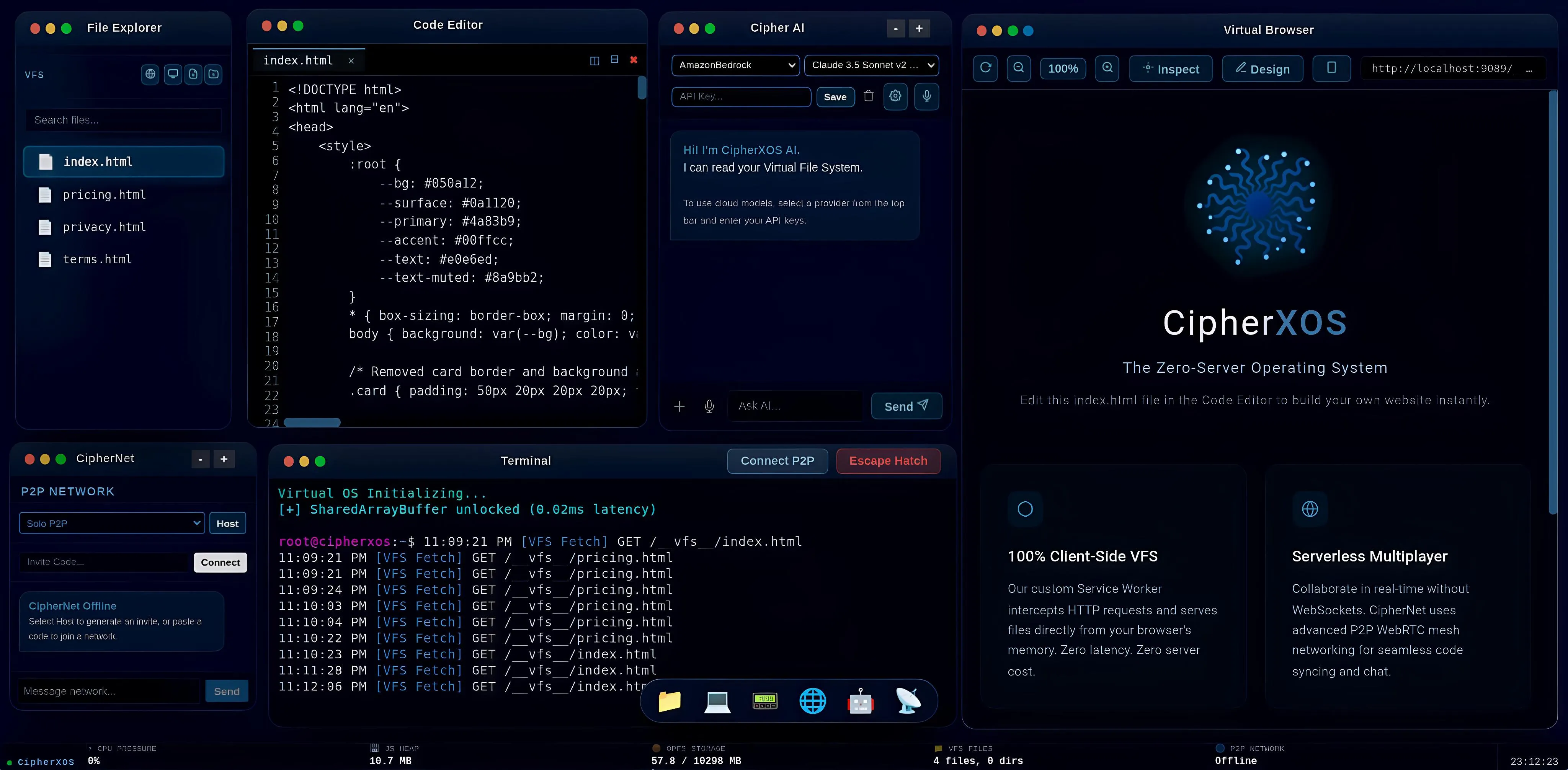
CipherXOS Full Desktop Operating System in Browser
Launch Live OS →
Live product interface running in browser Full-resolution desktop view • Click to zoom
WORKFLOW SEGMENTATION

Built for Modern Learning & Development

STUDENTS & LEARNERS

Code Anywhere, Install Nothing

Works on school lab PCs, low-spec laptops, and Chromebooks. Start writing Python, Web, or C++ code in seconds without installing VS Code, local interpreters, or dependencies.

DEVELOPERS & BUILDERS

A Private, Local-First Workspace

Fast custom editor, bash-like terminal, WebAssembly Python runtime, and browser-embedded SQLite database. Connect your own API keys with direct client-to-provider privacy.

CAMPUS & LABS

Roll Out a Coding Lab in Minutes

Reduce PC reconfiguration between class batches. Students sign in on any lab PC and resume their personal workspace. Per-seat vaults, bulk student keys, and GST tax invoices.

Request Institutional Quote →
DESKTOP ENVIRONMENT

Interactive Product Tour

Switch tabs below to inspect core components running inside the browser OS.

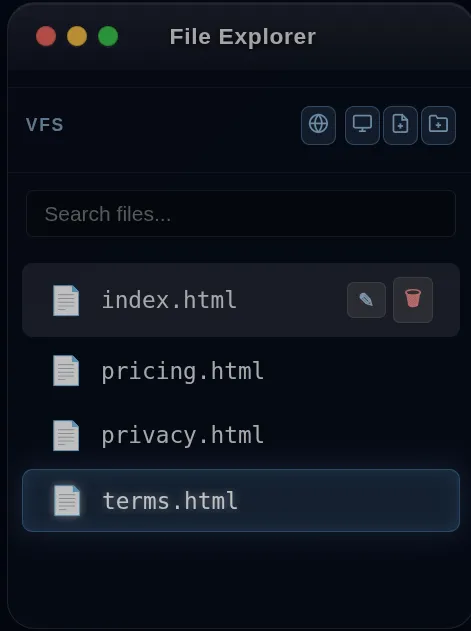
File Explorer

01. File Explorer

Manage your local assets securely within your browser local OPFS storage. Files stay on your device.

  • CREATE Source Files: Create files across Python, JavaScript, HTML, CSS, and Markdown.
  • STRUCT Organization: Build multi-level project structures in local storage.
  • OPFS Persistence: Fast Origin Private File System mimics a native operating system drive.

• VFS Technology: Virtual File System backed by browser Origin Private File System.
• Offline Capable: File navigation, editing, and execution run without an internet connection.
• Local-First: Source files remain in your local browser sandbox by default.

Code Editor

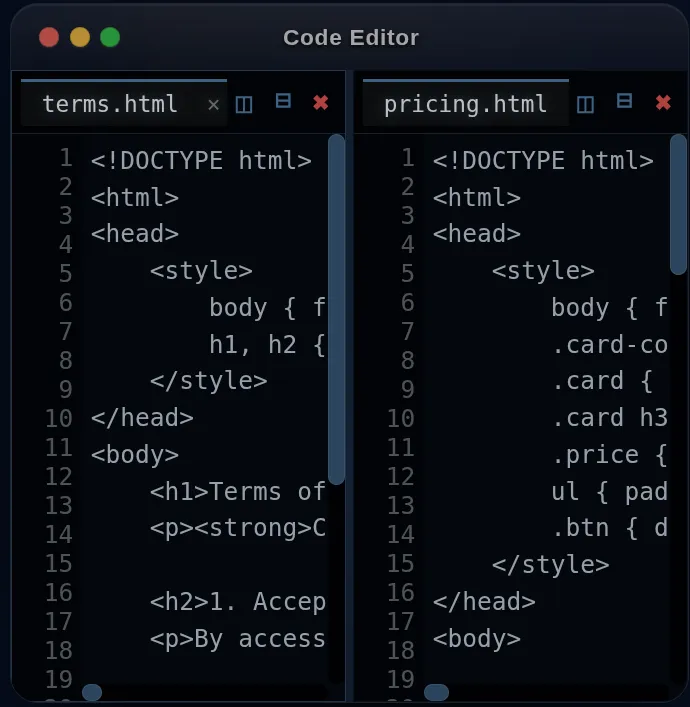
02. Code Editor

Custom-built lightweight editor with syntax highlighting, autocompletion, multi-cursor editing, and tabs.

  • TABS Multi-File Editing: Edit multiple project files simultaneously with tabs.
  • SAVE Auto-Save: Keystrokes commit continuously to local VFS without manual Ctrl+S.
  • THEME Dark UI: High-contrast developer theme optimized for long coding sessions.

• Lightweight & Fast: Fast load time without heavyweight desktop electron bundles.
• Local Execution: Keystrokes and compilation occur on user hardware.
• No Server Compute: Run full dev workflows without backend container provisioning.

Virtual Browser

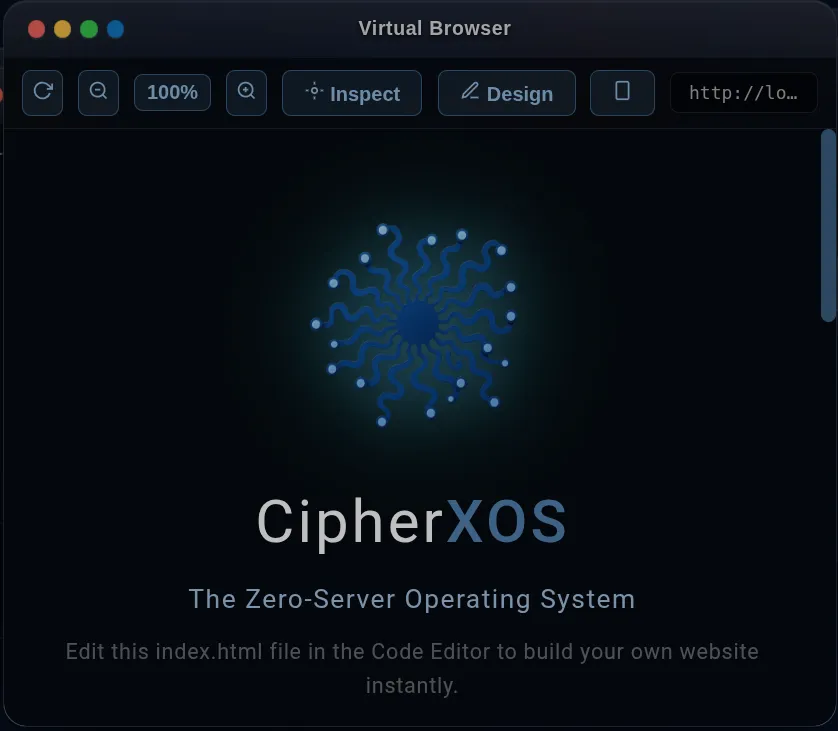
03. Virtual Browser

Live preview engine rendering your VFS code inside an isolated sandbox with zero server latency.

  • VIEW Scale Controls: Inspect responsive layouts across mobile, tablet, and desktop.
  • DOM DOM Inspector: Inspect and debug elements and console output in real time.
  • EDIT Design Mode: Visually tweak HTML and page styles live on screen.

• Live Preview: Real-time rendering without spinning up a local development server.
• Secure Sandbox: Code executes inside a restricted iframe boundary.
• Fast Prototyping: Immediate visual feedback loop for web scripts and frontends.

Terminal

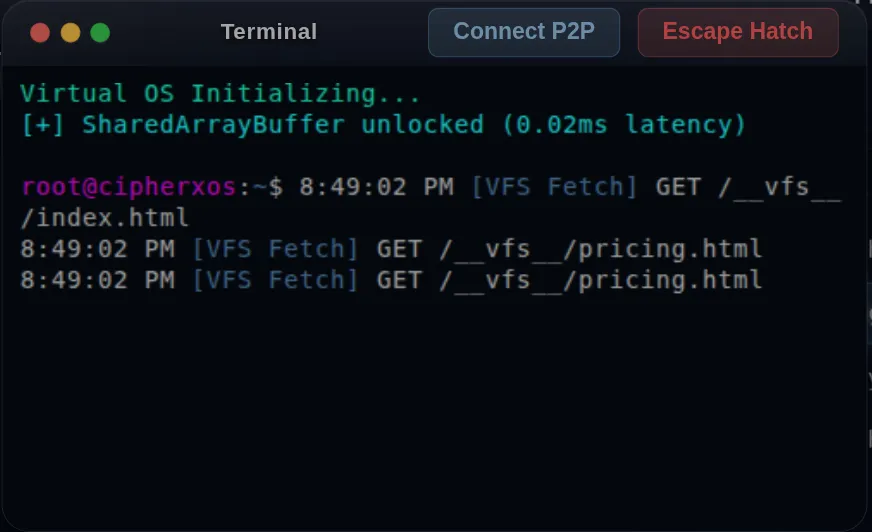
04. Terminal

Simulated shell environment allowing you to navigate the file system and run development commands.

  • CLI Standard Commands: Execute navigation and file utilities: ls, cd, cat, echo, pwd.
  • TRACE Network Monitor: Watch internal VFS fetches and network calls in real time.
  • RESET Recovery: Emergency UI and memory state recovery commands if a script hangs.

• Safe Learning: Practice shell commands safely with zero risk to the host computer.
• Process Isolation: Terminal processes run inside dedicated Web Workers.
• Self-Healing: Automated crash recovery prevents fatal browser tab freezes.

CipherNet P2P

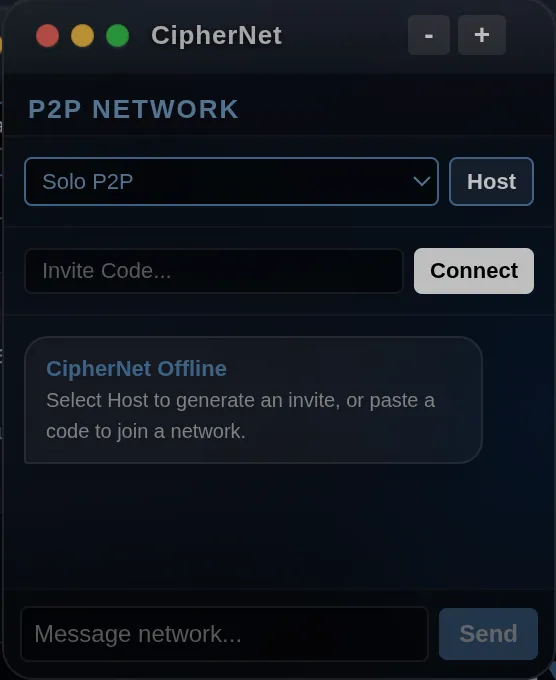
05. CipherNet P2P

Decentralized WebRTC peer-to-peer collaboration. Share workspaces or join peer environments directly.

  • SHARE Workspace Sharing: Generate an invite token to host a shared session.
  • JOIN Direct Connection: Connect directly to a peer workspace across browsers.
  • SYNC Data Channels: Low-latency keystroke and file transfer over WebRTC.

• Serverless Collaboration: Keystroke and file sync over WebRTC data channels.
• Local LAN Support: Operates securely on classroom or office local networks.
• Direct Sync: Keystrokes pass directly between browser instances.

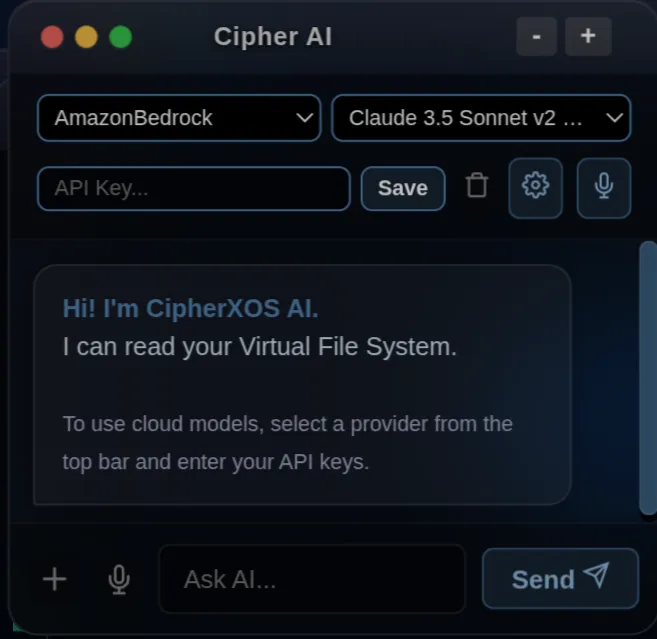
Cipher AI

06. Cipher AI

Built-in code assistance and debugging tool. Connect your own API keys with direct browser-to-provider privacy.

  • FIX Bug Detection: Intercepts runtime errors and suggests targeted code fixes.
  • RAG Context Awareness: Reads project files directly in browser memory to understand context.
  • BYOK Direct Provider API: API requests route directly from your browser to OpenAI or Anthropic.

• BYOK Architecture: Bring Your Own Key; we operate no middleman proxy server.
• In-Memory Parsing: Project files are analyzed in browser RAM before prompt construction.
• Zero Intermediary Logging: Prompts route directly from client browser to the chosen AI endpoint.

ARCHITECTURE
Core Engineering Capabilities

Architected from the ground up for resilience, privacy, and speed.

WASM RUNTIME

Multiple Languages, No Installs

Run Python via WebAssembly. C++ in the browser. Lua and Go on the roadmap. No server queues, no installations, no waiting.

AI ASSISTANT

AI Assistant (Bring Your Own Key)

Reads your project files and suggests code fixes. Bring your own API key with direct browser-to-provider privacy.

OPFS DATABASE

Real SQLite Databases Built-in

A relational database in your browser via OPFS. Saved workspaces, structured SQL queries, and local persistence included.

PARALLEL WORKERS

Multi-Threaded Execution

Web Workers and SharedArrayBuffer on Chromium-based browsers (Chrome, Edge, Brave, Opera).

CLIENT EXECUTION

No Server Compute For Your Code

Your code compiles and runs on your device. Scale across thousands of students or developers without a compute backend.

LOCAL STORAGE

Local-First Privacy

Files live in browser storage. Optional cloud vault with Pro for seamless cross-device roaming.

BUILT ON ANTRX

CipherXOS is Powered by the Cipher ANTRX Engine

The exact client-side modules powering this OS — AntrxSQL, AntrxCompute, AntrxCrypto, and AntrxMedia — are available as modular SDK packages for your own web application.

Explore All 54 Modular ANTRX APIs →
TRANSPARENT BOUNDARIES

Your Code, Your Storage

Clear separation between on-device execution and optional cloud synchronization.

LOCAL-FIRST STORAGE
Your code, databases, and assets live in your browser's Origin Private File System (OPFS) on your device.
OPTIONAL CLOUD VAULT
When PRO is active, workspace snapshots sync securely over TLS so you can resume sessions on other machines. Vault data is encrypted in transit and at rest; if you lose your license credentials, access can be reissued via billing verification.
DIRECT AI PRIVACY
AI calls connect straight from your browser to your AI provider with your API key. No intermediary proxy logging.
DATA DELETION & EXPORT
Export your complete workspace as a standard ZIP file or purge your cloud vault anytime. No proprietary format.
CAMPUS & LAB PC WORKLOADS

Run a Coding Lab Without Managing Machines

Reduce PC setup friction, configuration drift, and broken lab environments across classrooms.

No Installs Per PC
Open a browser and code. No local Python installs, compiler updates, or IT admin tickets.
Lab Machine Roaming
Students sign into their seat on any lab PC. Tabs, editor state, and files resume automatically.
Isolated 10 MB Vaults
Each student seat receives an independent 10 MB personal cloud vault for clean workspace isolation.
GST Invoices
Automated tax invoices with GSTIN, HSN/SAC codes, centralized admin desk, and bulk CSV seat generation.
1. Request Quote → 2. Pilot With One Class → 3. Roll Out Across Labs
Request Institutional Quote →
[ CIPHERXOS EDITIONS & SEAT LICENSES ]

CipherXOS Operating System Licenses

Per-seat licenses for the browser-native desktop workstation. Simple flat packages with flexible duration scaling, local OPFS storage, and encrypted workspace roaming.

Individual Developer

Flexible Pro License • ₹600 per 30 days

₹600 / 30 days
Selected Duration:
Days
10 Days (₹200) 30 Days (₹600) 90 Days (₹1,800) 365 Days (₹5,999)
Calculated Total:
30 Days Pro Access
₹600.00 INR
What Fits in Your 10 MB Cloud Vault:
• 1,000+ Code Files: Python, JS, HTML, CSS, C++, SQL
• 30-50 Complete Projects: Web apps, data science & 3D scripts
• Full OS State: Open editor tabs, panel dimensions & cursor position
*WASM runtimes (Python 30MB, Three.js) are cached in browser CacheStorage and do not consume your 10 MB quota.

[ PRIVATE BY DESIGN ]

Code compiles and runs on your device. Storage is kept locally in browser OPFS, with optional TLS cloud sync.

[ 10 MB CLOUD SYNC ]

Every PRO license includes a dedicated 10 MB cloud vault holding 1,000+ code files, 30-50 projects, and open tabs.

[ DIRECT DELIVERY ]

License keys are generated right after payment in your browser with automated email credentials backup.

[ GST INVOICES ]

Tax invoices with HSN/SAC codes and GSTIN are automatically generated and printable instantly.

[ OFFLINE READY ]

Works offline after first load. Core editor and WebAssembly runtimes run without an active internet connection.

FEATURE MATRIX

Community (Free) vs PRO vs Team

Compare capabilities across individual learning and multi-seat deployments.

Capability Community (Free) PRO Individual Teams & Labs
Code Editor, Syntax & Tabs ✓ Included ✓ Included ✓ Included
WebAssembly Python & C++ ✓ Included ✓ Included ✓ Included
Local OPFS SQLite Relational Database ✓ Included ✓ Included ✓ Included
Virtual Browser Sandbox Preview ✓ Included ✓ Included ✓ Included
Local Browser Terminal ✓ Included ✓ Included ✓ Included
Personal Cloud Vault − Local Only ✓ 10 MB Dedicated ✓ 10 MB Per Seat
Cross-Device Session Roaming − Single Device ✓ Any Browser ✓ Lab PC Roaming
Auto-Save Workspace Hibernation − Local Storage ✓ Continuous Cloud Sync ✓ Continuous Cloud Sync
Multi-Seat CSV Credentials Export − − ✓ Included
GST Invoices (GSTIN/HSN) − ✓ Included ✓ Centralized Billing
Price Free (No signup) ₹600 / 30 days ₹300 / user / 30 days
FREQUENTLY ASKED QUESTIONS

Common Questions & Technical Details

Everything developers, students, and educators ask before using CipherXOS.

1. Do I need to install anything on my computer? −
No. CipherXOS runs in standard web browsers. There are no desktop installers, background daemons, or electron packages required.
2. Which browsers and operating systems are supported? +
Chromium-based browsers (Google Chrome, Microsoft Edge, Brave, Opera) provide the fastest experience with multi-threaded Web Workers. Mozilla Firefox and Apple Safari support standard execution. Works across Windows, macOS, Linux, and ChromeOS.
3. Where is my code stored and is it private? +
Your code is stored locally in your browser Origin Private File System (OPFS). When you upgrade to PRO, workspace snapshots are synced over encrypted TLS to your dedicated cloud vault for cross-device roaming. Vault data is encrypted in transit and at rest; if you lose your credentials, access can be reissued via billing verification.
4. Does CipherXOS work offline? +
Yes. After the initial page load, the operating system shell, code editor, terminal, and WebAssembly runtimes run offline. AI assistant queries (which connect directly to your configured provider) and cloud vault synchronization require an active internet connection.
5. Can I export my files and projects? +
Yes. You can download individual source files or export your entire workspace as a standard ZIP file at any time. No proprietary format.
6. How does cross-device roaming work in PRO? +
PRO licenses include an auto-hibernation engine that saves your open tabs, panel dimensions, cursor position, and files to your dedicated 10 MB cloud vault. Signing into your PRO license on any other computer restores your exact workspace state.
7. How do schools and colleges deploy CipherXOS in computer labs? +
Institutions purchase Team / Lab seat licenses with a custom org prefix (e.g., DPS001 through DPS050). Students can sit at any lab PC, sign in, and immediately resume their coursework without IT staff installing software or reconfiguring machines.
8. What is the difference between Community and PRO? +
Community edition is free, requires no signup, and saves files in your local browser only. PRO unlocks 10 MB personal cloud vault storage, multi-device roaming across any browser, continuous auto-save recovery, and GST tax invoices.
9. What happens if I lose my license credentials? +
Your license username and password are automatically emailed to your billing address right after checkout. If you misplace them, contact our engineering support desk at support@cipherlook.com with your payment email or reference ID, and we will verify and restore your access.
10. What is your refund policy? +
We offer a full 7-day money-back satisfaction guarantee on all individual PRO licenses. If CipherXOS does not fit your learning or development workflow, simply reach out to support@cipherlook.com within 7 days of purchase for a prompt refund.
CLIENT-SIDE BROWSER RUNTIME

Open a tab. Start coding.

Experience browser-native development today. Launch the free community demo immediately or configure dedicated PRO and lab licenses.

Explore PRO Plans →
No installation required • Free community starter • GST invoices for labs